


steins.gg.Because the .gg domain was expensive to maintain and I could no longer keep operating the site, steins.gg was shut down.
Good morning/afternoon/evening! I made a GAS tool that sends tweets from specific Twitter accounts to a Discord channel. Anyone can use it by copy-pasting, so please give it a try.
Table of Contents
Open Table of Contents
Implementation
appscript.json
{
  "timeZone": "Asia/Tokyo",
  "dependencies": {},
  "exceptionLogging": "STACKDRIVER",
  "runtimeVersion": "DEPRECATED_ES5"
}
main.gs
// Script Properties keys (Notes 1 and 7)
TWEET_ID = "TWEET_ID";
ERROR_COUNT = "ERROR_COUNT";

// Discord Webhook URL (channel post)
// Specify the Webhook URL for the channel you want to post to.
WEBHOOK_URL =
  "https://discord.com/api/webhooks/10302~~~~2318571682/djsOkj561fZ-R7E~~~~~~~~~~~~nGWljsDWEWpKZWwuh-38m3L55SKhM3JQ6MfT";

// source strings used to detect ads (Note 3)
PROMOTION_SOURCE = "Twitter for Advertisers";
BELUGA_CAMPAIGN_SEA_SOURCE = "BelugaCampaign";
PROMOTION_SOURCE2 = "advertiser";

// configMap uses Twitter IDs as keys and maps them to Discord destinations.
// - threadId: Discord thread_id
// - postTopChanel: if true, also post to the top-level channel (Notes 4 and 5)
var configMap = {
  gundamevo_jp: { threadId: "1062662~~~~6183060", postTopChanel: true },
  gggp_official: { threadId: "1062662~~~~56183060", postTopChanel: false },
  valorantjp: { threadId: "1062661~~~~10087937", postTopChanel: true },
  jpplayoverwatch: { threadId: "1062662~~~~44773170", postTopChanel: true },
  playapex: { threadId: null, postTopChanel: true },
  gamewith_apex: { threadId: "10626700~~~~2572427", postTopChanel: false },
  apexmapbot: { threadId: "1062670~~~~92572427", postTopChanel: false },
  nikke_japan: { threadId: "10531766~~~~3132328", postTopChanel: false },
  blueprotocol_jp: { threadId: "105317~~~~351677480", postTopChanel: false },
  pubg_japan: { threadId: null, postTopChanel: true },
};

var options = {
  method: "get",
  headers: {
    authorization: "Bearer AAAAAAAAAAAAAAAAAAAAAC7OTAEAAAAA.....",
  },
  muteHttpExceptions: true,
};

function main() {
  // Note 7: Stop if too many errors accumulate
  if (
    Number(PropertiesService.getScriptProperties().getProperty(ERROR_COUNT)) >
    80
  ) {
    Logger.log("skip");
    return;
  }

  // Note 1: Previously processed tweet ID (used for since_id)
  var tweetId = PropertiesService.getScriptProperties().getProperty(TWEET_ID);

  // Search target accounts together as from:xxx OR from:yyy ...
  var query = "";
  Object.keys(configMap).forEach(function (configKey) {
    query += "from:" + configKey + " OR ";
  });
  query = query.slice(0, -3); // Remove the trailing " OR "
  console.log(query);

  var url =
    "https://api.twitter.com/2/tweets/search/recent?max_results=100&since_id=" +
    tweetId + // Note 1
    "&query=(" +
    query +
    ")" +
    "&user.fields=username&tweet.fields=source";
  // Add -is:retweet to exclude RTs (for people who do not need the Note 4 behavior)
  //+ "%20-is:retweet&user.fields=username&tweet.fields=source";
  // Add -is:reply to exclude replies (for people who do not need the custom Note 5 check)
  //+ "%20-is:retweet%20-is:reply&user.fields=username&tweet.fields=source";

  // Receive the fetched tweets in bulk
  var response = JSON.parse(UrlFetchApp.fetch(url, options));
  Logger.log(response);

  if (response.data == null) {
    Logger.log("No data");
    return;
  }

  try {
    // Note 2: Sort fetched tweets from oldest to newest (post to Discord oldest → newest)
    var reversed = response.data.reverse();

    reversed.forEach(function (data) {
      sendToDiscord(data);
      Utilities.sleep(1000); // Note 2: Send one tweet per second (rate-limit mitigation)
    });
  } catch (e) {
    // Note 7: Increment the count on failure (so it does not keep running during Discord / Twitter API outages)
    var error =
      PropertiesService.getScriptProperties().getProperty(ERROR_COUNT);
    PropertiesService.getScriptProperties().setProperty(
      ERROR_COUNT,
      Number(error) + 1
    );
    PropertiesService.getScriptProperties().setProperty("ERROR", e.toString());
    Logger.log(e);
  }
}

// Function for sending to Discord
function sendToDiscord(data) {
  // Fetch detailed tweet data
  var url2 =
    "https://api.twitter.com/2/tweets/" +
    data.id +
    "?tweet.fields=entities,context_annotations";
  var response2 = JSON.parse(UrlFetchApp.fetch(url2, options));
  Logger.log(response2);

  // Note 3: Exclude tweets whose source looks like ads
  if (
    response2.source.toString().indexOf(PROMOTION_SOURCE) >= 0 ||
    response2.source.toString().indexOf(BELUGA_CAMPAIGN_SEA_SOURCE) >= 0 ||
    response2.source.toString().indexOf(PROMOTION_SOURCE2) >= 0
  ) {
    Logger.log("promotion");
    Logger.log(response2.source.toString());

    // Note 1: Save this tweet ID as processed (next run fetches the delta with since_id)
    PropertiesService.getScriptProperties().setProperty(TWEET_ID, data.id);
    return;
  }

  var payload = {};

  if (response2.retweeted_status !== undefined) {
    // Note 4: For RTs:
    // - Display name/icon comes from the original RT user (retweeted_status.user)
    // - Destination thread is tied to the account that retweeted it (response2.user.screen_name)
    if (
      response2.retweeted_status.user.name.toUpperCase().indexOf("DISCORD") >= 0
    ) {
      // Discord policy does not allow the string Discord in a webhook username,
      // so only when the name contains Discord, replace o with a similar-looking character.
      payload.username = response2.retweeted_status.user.name.replace("o", "ᴑ");
    } else {
      payload.username = response2.retweeted_status.user.name;
    }
    payload.avatar_url =
      response2.retweeted_status.user.profile_image_url.replace("_normal", "");
    payload.content =
      "Retweeted by @" +
      response2.user.screen_name +
      "\n" +
      "https://twitter.com/" +
      response2.retweeted_status.user.screen_name +
      "/status/" +
      response2.retweeted_status.id_str;

    postToWebhook(payload, response2.user.screen_name);
  } else if (
    // Note 5: (custom feature) PlayApex excludes replies to accounts other than itself
    // Some official accounts reply a lot, so this kind of check is useful in those cases
    response2.in_reply_to_screen_name != null &&
    response2.in_reply_to_screen_name != response2.user.screen_name &&
    response2.user.screen_name == "PlayApex"
  ) {
    Logger.log(response2.in_reply_to_screen_name);
    Logger.log(response2.user.screen_name);
    Logger.log("Skip replies to other users by PlayApex.");
  } else if (
    // Note 6: (custom feature) ApexMapBot excludes anything other than Craft Rotation tweets
    // Add this kind of check when you only want tweets from a specific account containing a specific word
    response2.user.screen_name == "ApexMapBot" &&
    response2.text.indexOf("Craft Rotation") == -1
  ) {
    Logger.log("Skip not craft rotation by ApexMapBot.");
  } else {
    // Tweet Payload
    Logger.log(response2.user.screen_name);
    payload.username = response2.user.name;
    payload.avatar_url = response2.user.profile_image_url.replace(
      "_normal",
      ""
    );
    payload.content =
      "https://twitter.com/" +
      response2.user.screen_name +
      "/status/" +
      data.id;

    postToWebhook(payload, response2.user.screen_name);
  }

  // Note 1: Save this tweet ID as processed
  PropertiesService.getScriptProperties().setProperty(TWEET_ID, data.id);
}

function postToWebhook(payload, screenName) {
  // If screenName is not in configMap this will fail, so normally keep it aligned with target account keys
  var config = configMap[screenName.toLowerCase()];

  // Send to the top-level channel
  if (config.postTopChanel) {
    UrlFetchApp.fetch(WEBHOOK_URL, {
      method: "post",
      contentType: "application/json",
      payload: JSON.stringify(payload),
    });
  }

  // Send to a thread (append thread_id to the webhook)
  if (config.threadId != null) {
    UrlFetchApp.fetch(WEBHOOK_URL + "?thread_id=" + config.threadId, {
      method: "post",
      contentType: "application/json",
      payload: JSON.stringify(payload),
    });
  }

  // Note 7: Decrement the count on success (recovery)
  var errorCount =
    PropertiesService.getScriptProperties().getProperty(ERROR_COUNT);
  if (errorCount > 0) {
    PropertiesService.getScriptProperties().setProperty(
      ERROR_COUNT,
      Number(errorCount) - 1
    );
  }
}
Behavior
Twitter’s latest tweets are fetched for each account and automatically sent to the specified Discord channel / thread.
- Note 1: To avoid sending the same tweet repeatedly, the previously processed tweet ID is saved in
Script Properties(TWEET_ID), and the next run fetches only the difference withsince_id - Note 2: The fetched tweets are sorted from oldest to newest, and Discord posts are sent at 1 tweet = 1 second intervals
- Note 3: Tweets whose
sourcecontains ad-like strings are excluded - Note 4: RTs are posted with the original user’s name and icon, while the destination thread is tied to the account that retweeted them
- Note 7: If errors pile up, the script stops; when it succeeds,
ERROR_COUNTis gradually reduced again
The following are custom features for my own use. You can delete this code when copying the script, but I am including it as a sample of how you can add your own conditions.
- Note 5: PlayApex excludes “replies to someone other than itself”
- Note 6: ApexMapBot excludes anything other than tweets containing “Craft Rotation”
How to Operate
Replace authorization and Thread ID as needed.
Set the main() function to run automatically with a time-driven trigger every 1 minute.
Note: As far as I tested, the search API did not seem to have a rate limit?
If you do not need that much real-time behavior, adjust the interval as needed, such as every 30 minutes.
Operation Sample
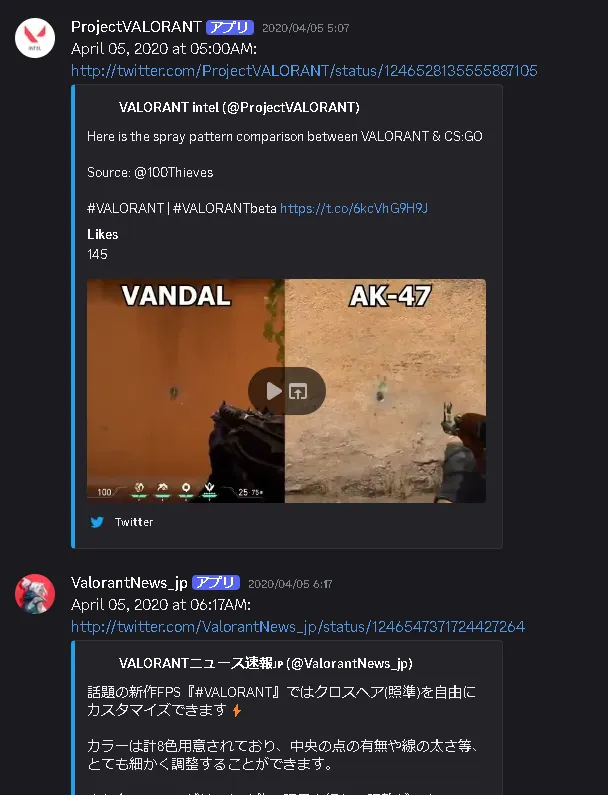
It looks like this. It is very convenient because you can check the latest information from various accounts together in the specified Discord channels and threads.
![[PUBG] Lessons from Building and Operating Steins.GG, a Match Analysis Web App with 80,000 Cumulative Users](https://blog.devkey.jp/en/posts/steinsgg-lessons-learned/index.png)

![[Twitch Follower Checker] How to Check New Followers and Unfollowers on a Twitch Channel](https://blog.devkey.jp/en/posts/twitch-follower-checker/index.png)