Old Twitter’s “quickly trim a video in the browser” clip feature was quietly amazing, wasn’t it? For simply posting game clips, the experience was more than good enough, but at some point the feature itself disappeared.
If it does not exist, build it—so I brought back that old experience as a Chrome extension. And since I wanted to throw some new tech at it anyway, I implemented front-end-only video processing with ffmpeg.wasm + WebCodecs.
Table of Contents
Open Table of Contents
What I Built
Easy Video Trimmer for X.com

Brought back the super-handy video clipper Twitter removed—rebuilt for X.com. Adds a scissors icon to the post composer so you can drop in a video, drag start/end handles, and trim in seconds.
Design
The overall workflow looks like this.
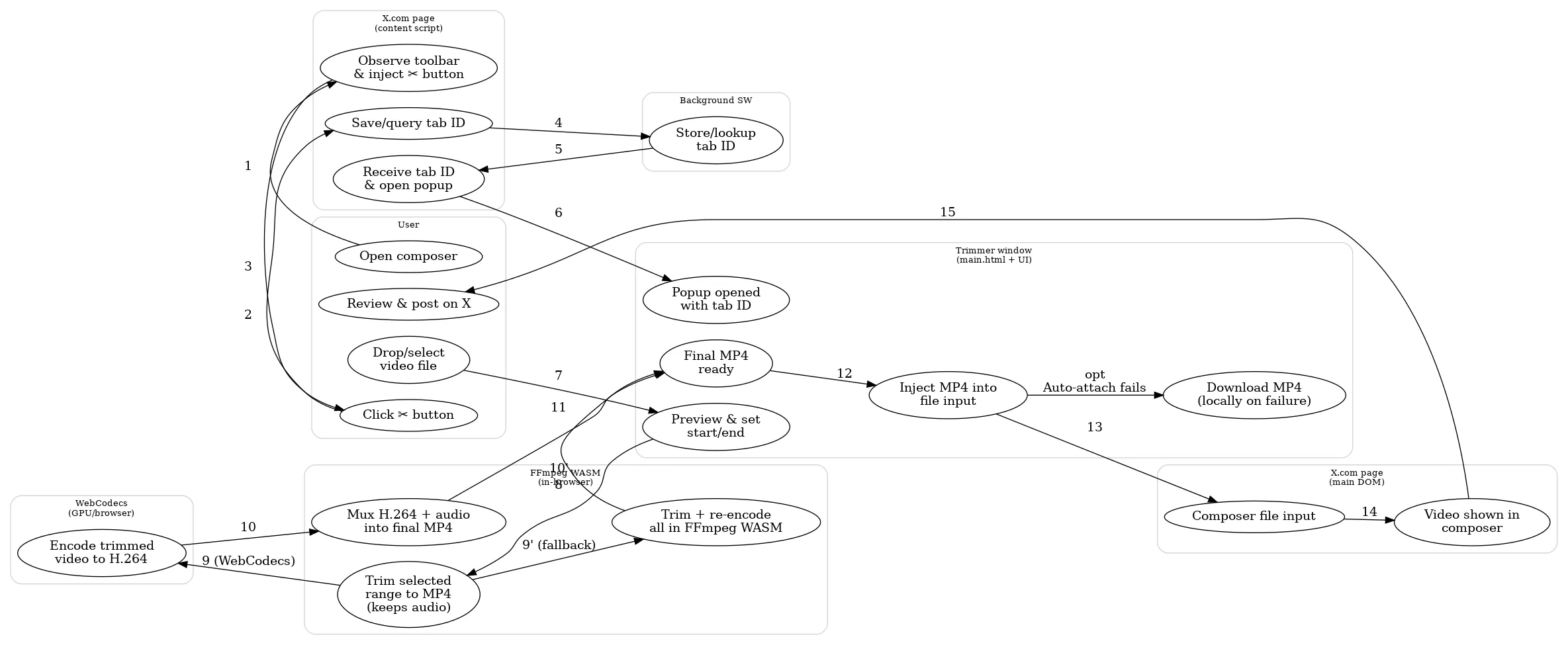
Implementation pain points
Wanting to attach the processed video “directly” to X.com
This is point #1 that I really cared about.
Since I wanted to avoid the flow of “download the trimmed MP4 once → attach it manually” every time, I built it to automatically insert the MP4 into X’s post form after trimming completes.
Specifically, I run chrome.scripting.executeScript with world: "MAIN",
and in the page-side context I insert a File into input[data-testid="fileInput"] via DataTransfer.
Chrome extension content scripts run in an isolated world, so their execution context is separated from the page-side JavaScript.
On top of that, X.com has a fairly strict CSP, so you generally cannot insert an arbitrary <script> inline.
By using executeScript to run the processing on the main-world side, I made it possible to integrate with the “X-side DOM / event handlers”.
const [result] = await chrome.scripting.executeScript({
  target: { tabId },
  world: "MAIN",
  args: [base64, fileName, "video/mp4"],
  func: (b64, name, type) => {
    // base64 → Uint8Array
    const bin = atob(b64);
    const bytes = new Uint8Array(bin.length);
    for (let i = 0; i < bin.length; i++) {
      bytes[i] = bin.charCodeAt(i);
    }

    // executeScript arguments must be structured-cloneable,
    // so the trimmed Blob is first converted to base64 before being passed,
    // then restored to a Blob / File on the main-world side.
    const blob = new Blob([bytes], { type });
    const file = new File([blob], name, { type });

    // Insert into <input type="file"> via DataTransfer
    const dt = new DataTransfer();
    dt.items.add(file);

    const input =
      document.querySelector('input[data-testid="fileInput"]') ||
      document.querySelector('input[type="file"][accept*="video"]');

    if (!input) {
      return { attached: false, reason: "Tweet file input not found" };
    }

    input.files = dt.files;
    input.dispatchEvent(new Event("change", { bubbles: true }));
    input.dispatchEvent(new Event("input", { bubbles: true }));

    return { attached: true };
  },
});
Code running in world: "MAIN" operates in the same world as the page, but conversely it cannot use the chrome.* API, so I designed the interaction around arguments and return values (this was another subtle trap).
Along with this, I added permissions to manifest.json as follows.
"permissions": ["scripting"]
"host_permissions": ["https://x.com/*"]
Encoding with ffmpeg.wasm is far too slow
This is point #2 that I really cared about.
The biggest bottleneck was that the WASM version of ffmpeg encodes orders of magnitude more slowly than the native version.
| Task | Native ffmpeg 6.1 | ffmpeg.wasm 0.12.x |
|---|---|---|
| 720p MPEG-2 → H.264 (about 4 minutes) | about 500 fps | about 40 fps |
The official documentation also states that it is slower than native and that even the multithreaded version has limits. Reference: https://ffmpegwasm.netlify.app/docs/performance/
Put simply, the root causes of the slowdown are these two points.
- GPU encoders cannot be used from WASM
- Because ffmpeg.wasm is WebAssembly running in the browser, it cannot access hardware encoders such as NVENC / QuickSync / VideoToolbox.
- As a result, encoding speed depends on CPU specs
- Multithreading also has constraints
- In Chromium environments, there is a bug where only up to 4 threads work properly
- In other words, even if the CPU is powerful, it cannot be used fully
As a result, trying to encode longer videos stretches the waiting time to an unrealistic level. I decided that was too harsh for a tool meant for everyday use.
As the solution, I went with a hybrid architecture using WebCodecs + ffmpeg.wasm.
The problem where only the first few seconds of the clip broke (the mid-GOP trap)
This is point #3 that I really cared about, and the one I got stuck on the hardest.
When I cut out an MP4 with ffmpeg.wasm using -c copy and then re-encoded it with WebCodecs,
the first 1–2 seconds of the clip would sometimes show block noise or stuttering.
Roughly speaking, the cause was cases where the clip “started from a halfway position while ignoring GOP (keyframe) boundaries”.
-c copy is fast because it does not re-encode, but depending on the cut position, decoding at the beginning can easily become unstable.
What helped here was the option placement and -copyinkf.
Before the fix (output-side seek)
ffmpeg -i input.mp4 -ss 00:36:18 -to 00:39:50 -c copy out.mp4After the fix (input-side seek + copyinkf)
# After the fix (input-side seek + keyframe alignment + copyinkf)
ffmpeg -ss 00:36:18 -i input.mp4 -to 00:39:50 -c copy -copyinkf out.mp4
There are 2 key points.
- When
-ssis placed as an input option (before-i), the basic behavior is to “jump to a nearby seek point.” (ffmpeg seeks at the demuxer level.) -copyinkfis an option that “also copies non-keyframes found at the beginning when stream copying”
Closing
Building something while trying new technologies is fun because you learn a lot. There is a chance it will break due to changes in X.com’s DOM or specifications, so I will handle that through maintenance and operations (if there are too many changes, it is over. Elon, stop changing the UI all the time).
I will add updates if anything else comes up.
![I Want to Use Browser Twitter’s Video Clip Feature on X.com Too! [Easy Video Trimmer for X.com]](https://blog.devkey.jp/en/posts/easy-video-trimmer-for-x/index.png)