


This is a write-up about publishing deadlock-japanese.devkey.jp, a site that distributed a localization config file for playing Deadlock in Japanese. It is about how happy I was that far more people used it than I expected, and also about how hard it was.
Table of Contents
Open Table of Contents
Things that made me happy
REJECT’s YamatoN and ZETA DIVISION’s XQQ introduced it. That alone made my motivation skyrocket.
XQQ:
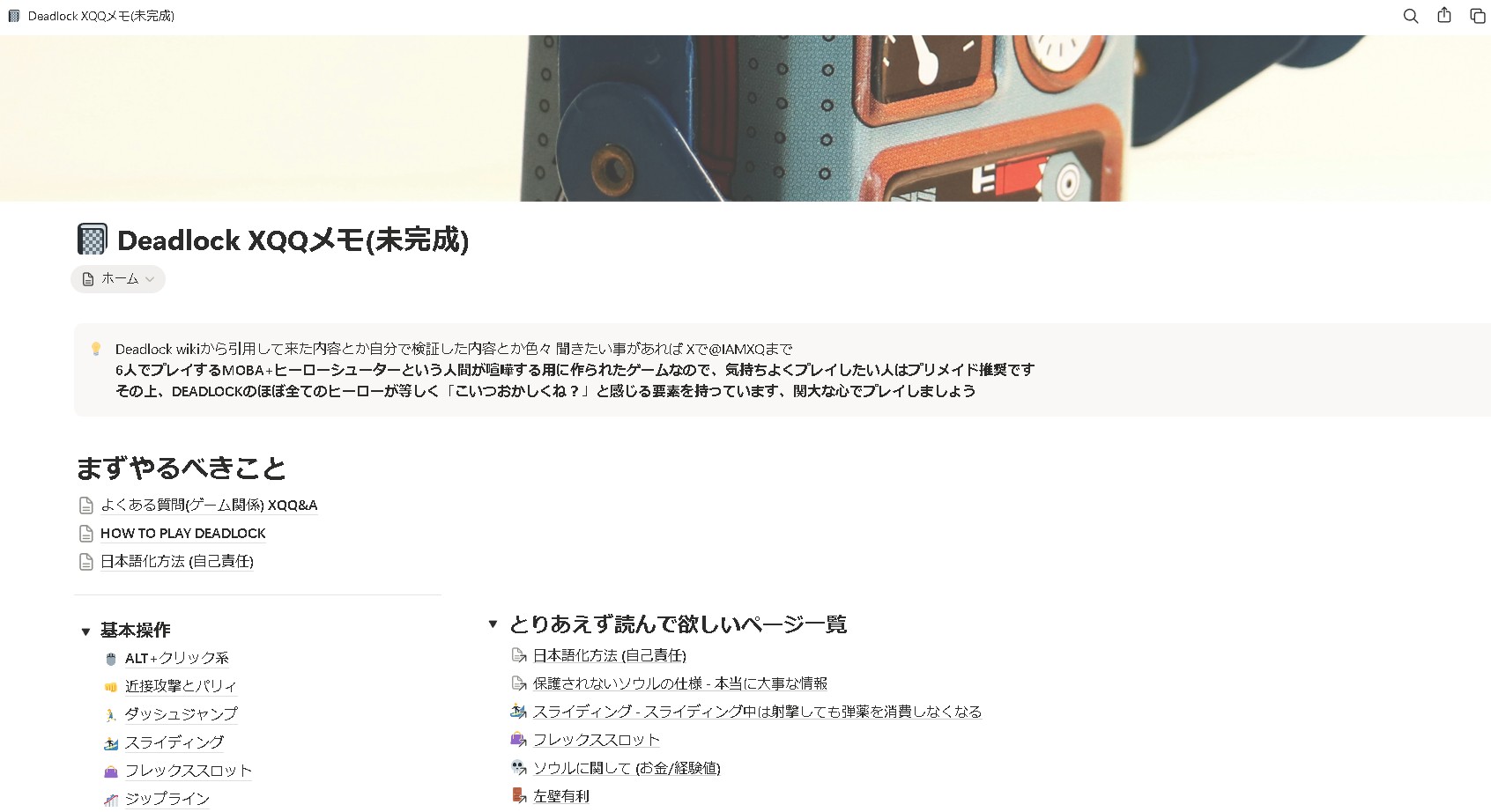
Deadlock XQQ Notes (unfinished)
Various notes quoted from the Deadlock wiki, things I verified myself, and more. If you have questions, contact @IAMXQ on X. Deadlock is a 6-player MOBA + hero shooter basically designed for people to argue, so premades are recommended if you want to play comfortably.
YamatoN:
A lot of people used it
- It received quite a few reactions on social media
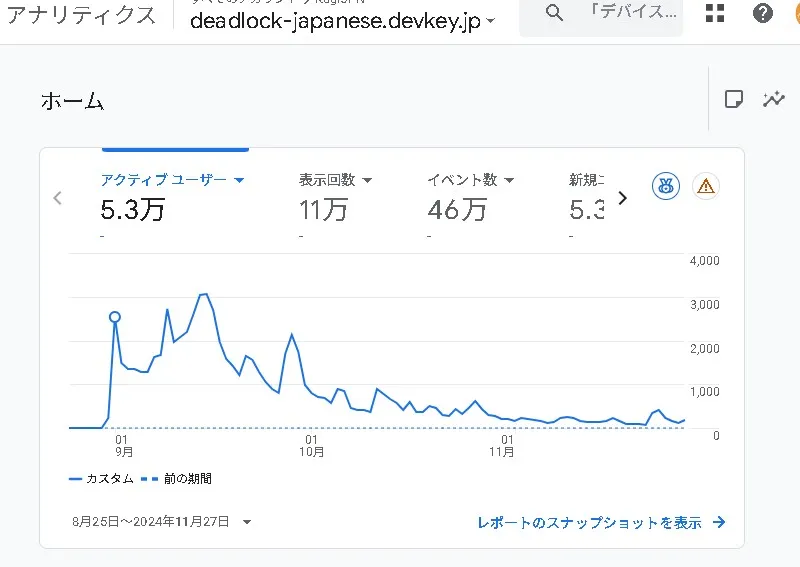
- It was used by more than 50,000 active users according to Google Analytics 4
I got exposed to a huge amount of raw English
My original reason for making this config file was “so I could enjoy Deadlock more myself,” but another part of the challenge was that I thought it would be nice if it also became English practice.
Because of my job, I study English from time to time, but in the end, I cannot keep going unless I have something I can get desperate about. I have started studying English more than ten times. Which means… I have also quit more than ten times…
By publishing it, I also created a kind of pressure where I had no choice but to keep touching English.
Points I cared about
Creating a request form
I was making this as an individual, so it was physically impossible to check every translation for every character and every item, including omissions and mistranslations. So I wanted to operate it in a way that involved users for mistranslation fixes and improvement suggestions, and I made it possible to send requests through a Google Form.
Publishing the update history
I made changes visible through an update history.
If I were a user, I would wonder, “Is this following the latest version?” I also would not want to use a config file where that was a black box.
Also, I did not want people who had gone out of their way to send correction or improvement suggestions to be left wondering, “Was this reflected or not?” If things stayed that way, people who were willing to keep helping might decrease.
Things that were hard
Updates were frequent, and there were many content changes
Deadlock itself was experimental gameplay, so updates were extremely frequent. On top of that, the amount of text changes was huge. Honestly, continuing to maintain it alone was normally impossible. …though I still forced myself to do it alone.
Understanding the in-game behavior was hard
Especially because I was the kind of player who only used Shiv and Mo & Krill, it was hard to understand the detailed behavior of other characters and track what changed in updates.
There were many descriptions where, unless I understood the behavior, I would end up thinking, “What is this even saying?”
For example, Mirage’s passive skill description said:
Passive: Your shots apply an increasing multiplier on the target. When the multiplier on a target expires or you reach the max, it’s consumed and the target suffers Spirit Damage and is briefly revealed on the map. The final damage is the base damage times the multiplier.
If I translated that too literally, it would become something like:
Passive: Your shots apply an “increasing multiplier” to the target. When the multiplier on the target expires or reaches the maximum, it is consumed, the target takes Spirit Damage, and is briefly revealed on the map. The final damage is base damage multiplied by the multiplier.
That is readable as English/Japanese, but someone who has never used Mirage would still ask, “So what actually happens?” I certainly did.
After actually playing Mirage, checking the behavior, and unpacking the intent, the explanation becomes more like this:
Passive: Each time you hit the same enemy with bullets, a damage multiplier, or stack, accumulates on that enemy. When the multiplier reaches the maximum, or when the effect expires because you stop hitting them for a certain amount of time, the accumulated stacks are reset, the enemy takes Spirit Damage, and that enemy’s position is shown on the minimap for a short time. The damage triggered when the stacks are consumed is base damage × the accumulated multiplier.
I often had to translate in this more interpretive way, aligned with the actual in-game behavior. In the example above, I supplemented the meaning with words like stacks and accumulation, and I filled in the subject, target, and timing, such as who appears on the map and when.
Translation was simply difficult
To begin with, I am not super strong at English, and I was also a complete MOBA beginner, so I struggled a lot with colloquial expressions, idioms, and MOBA slang.
My first reaction of “What does Deny mean? Refuse?” is now a good memory. Well, precisely because I knew nothing about MOBAs and had a hard time, I ended up making this config file in the first place.
For colloquial expressions and idioms, asking ChatGPT can still help me understand them to some extent, but there were quite a few sentences that depended on in-game context, or only made sense if I picked up another bit of context shown on the same screen.
Sometimes the text would just say it. Which it are you talking about?
In other words, there were patterns where simply translating each sentence one-to-one was not enough, and that was painful.
People using old data complained
Obviously, the config file I distributed this time does not update automatically.
However, quite a few people seemed to think that once they downloaded and applied it, it would automatically follow Deadlock’s own updates. Through the form, DMs, and replies, I received many complaints like “the data is old” and “new characters and new items are not translated.”
Of course, there were cases where I simply had not caught up yet, but about half of them were people who had forgotten to update the config file. Wow… running this alone is hard!!
There were many completely unrelated inquiries
After installing the config file, people said things like “the image quality got worse,” “my FPS dropped,” or “the client crashed.” Since it is a language file, in principle it does not directly affect the game’s rendering or performance.
It is true that Deadlock had many bugs because it was experimental gameplay, but when every bug was blamed on this config file, that was honestly tough. Explaining things over DM to someone who was already convinced “this must be the cause!” was extremely hard.
How did I keep updating it?
This is the technical part.
The rough flow was:
- Detect changes in the official language resources → get notified
- Detect additions, changes, and deletions with Python
- Translate and update
- Announce the update
Detecting changes in the official language resources → notification
I used Watch on SteamDatabase’s GitHub repo so that I would receive email notifications when the contents changed.
Detecting additions, changes, and deletions with Python
- Newly added properties were newly translated
- Changed properties were retranslated
- Removed properties were deleted
Specifically, I wrote the following Python file myself and kept steadily translating and updating.
import argparse
import re
import sys
from pathlib import Path

TOKEN_RE = re.compile(r'^\s*"([^"]+)"\s*"(.*)"\s*$')
COMMENT_RE = re.compile(r"^\s*//")


def read_text(path: Path) -> str:
    return path.read_text(encoding="utf-8-sig")


def extract_tokens(text: str) -> dict:
    tokens = {}
    for line in text.splitlines():
        if COMMENT_RE.match(line):
            continue
        match = TOKEN_RE.match(line)
        if match:
            tokens[match.group(1)] = match.group(2)
    return tokens


def compute_diff(old_tokens: dict, new_tokens: dict) -> tuple[dict, dict, dict]:
    old_keys = set(old_tokens.keys())
    new_keys = set(new_tokens.keys())
    added = {key: new_tokens[key] for key in new_keys - old_keys}
    removed = {key: old_tokens[key] for key in old_keys - new_keys}
    changed = {
        key: {"old": old_tokens[key], "new": new_tokens[key]}
        for key in old_keys & new_keys
        if old_tokens[key] != new_tokens[key]
    }
    return added, removed, changed


def build_category_paths(category_dir: Path) -> tuple[str, Path, Path]:
    name = category_dir.name
    old_file = category_dir / f"old_{name}_english.txt"
    new_file = category_dir / f"{name}_english.txt"
    return name, old_file, new_file


def list_categories(base_dir: Path) -> list:
    categories = []
    for child in sorted(base_dir.iterdir()):
        if not child.is_dir():
            continue
        name, old_file, new_file = build_category_paths(child)
        if old_file.exists() and new_file.exists():
            categories.append(child)
    return categories


def resolve_category_dir(base_dir: Path, category: str) -> Path:
    candidate = Path(category)
    if candidate.is_dir():
        return candidate
    return base_dir / category


def print_section(label: str, entries: dict, show_changed: bool) -> None:
    if not entries:
        print(f"{label}: (none)")
        return
    print(f"{label}:")
    for key in sorted(entries.keys()):
        value = entries[key]
        if show_changed:
            print(f"  {key}:")
            print(f'    "{value["old"]}"')
            print(f'    "{value["new"]}"')
        else:
            print(f'  {key}: "{value}"')


def process_category(category_dir: Path) -> int:
    name, old_path, new_path = build_category_paths(category_dir)
    if not old_path.exists():
        print(f"Old file not found: {old_path}", file=sys.stderr)
        return 1
    if not new_path.exists():
        print(f"New file not found: {new_path}", file=sys.stderr)
        return 1

    old_text = read_text(old_path)
    new_text = read_text(new_path)
    old_tokens = extract_tokens(old_text)
    new_tokens = extract_tokens(new_text)
    added, removed, changed = compute_diff(old_tokens, new_tokens)

    print(f"[{name}]")
    print(f"old: {old_path}")
    print(f"new: {new_path}")
    print_section("added", added, show_changed=False)
    print_section("removed", removed, show_changed=False)
    print_section("changed", changed, show_changed=True)
    print("")
    return 0


def parse_args() -> argparse.Namespace:
    parser = argparse.ArgumentParser(description="Compare Deadlock localization English files.")
    parser.add_argument(
        "--base-dir",
        default=Path(__file__).resolve().parent,
        type=Path,
        help="Base localization directory (default: script directory).",
    )
    parser.add_argument("--dir", help="Category directory name or path.")
    parser.add_argument("--all", action="store_true", help="Process all categories.")
    return parser.parse_args()


def main() -> int:
    args = parse_args()

    if args.dir and args.all:
        print("--dir cannot be combined with --all.", file=sys.stderr)
        return 2

    if not args.dir and not args.all:
        args.all = True

    if args.all:
        categories = list_categories(args.base_dir)
        if not categories:
            print(f"No categories found under {args.base_dir}", file=sys.stderr)
            return 2
    else:
        categories = [resolve_category_dir(args.base_dir, args.dir)]

    exit_code = 0
    for category_dir in categories:
        exit_code = max(exit_code, process_category(category_dir))

    return exit_code


if __name__ == "__main__":
    raise SystemExit(main())
Example of displaying additions
added:
  ActiveMoveSpeedPenalty_label: "Active Movespeed Penalty"
  ActiveMoveSpeedPenalty_postfix: "m/s"
Example of displaying removals
removed:
  JarDamage_label: "Jar Damage"
  WallToWallDistance_label: "Max Web Distance"
Example of displaying changes
Example from when Time on Kill changed to Duration On Kill:
changed:
  ShadowFormDurationOnKill_label:
    "Time on Kill"
    "Duration On Kill"
Distributing updates as quickly as possible
Because updates were so fast, I tried to keep the cycle of detecting diffs → translating → applying → distributing as quick as possible.
I worked really hard, and it was really tough…
In closing
Deadlock was a great game…
I’m grateful for everything that led me to meet you!!!
P.S.
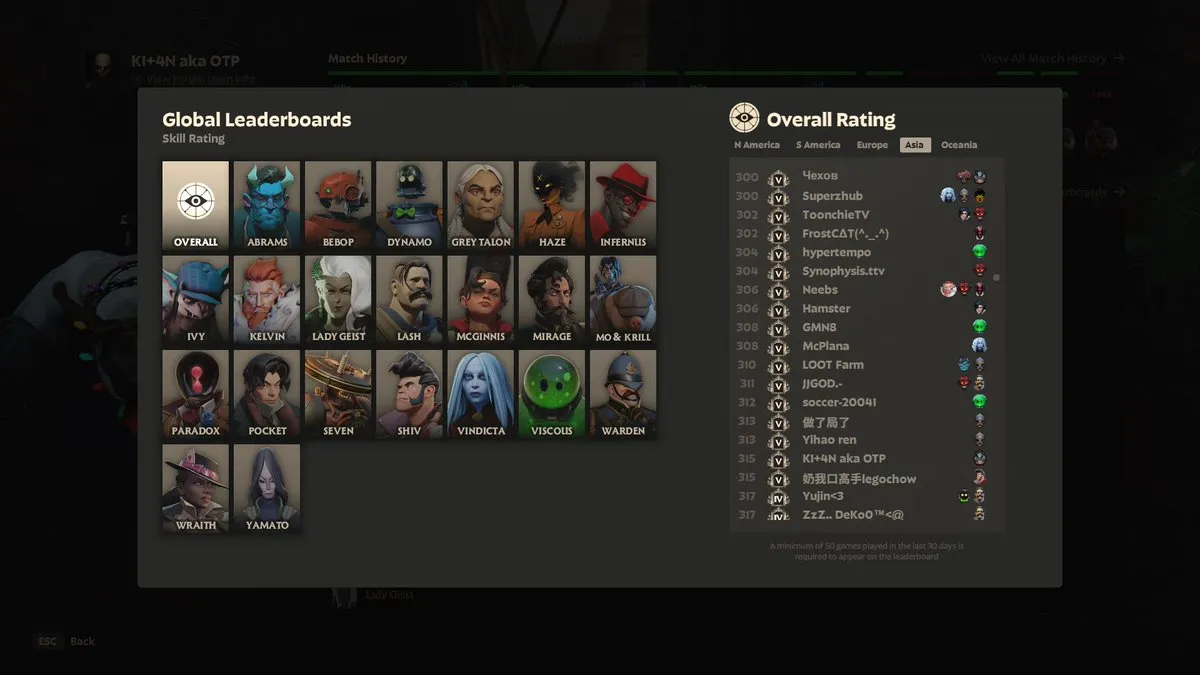
It is a good memory that I was almost a Mo & Krill OTP and reached 315th Overall Rating in Asia.
![[Deadlock] How to Play in Japanese [Japanese Localization Config File Download]](https://blog.devkey.jp/en/posts/launching-deadlock-japanese-settings/index.png)
![[Deadlock] How to Set a Maximum FPS Limit](https://blog.devkey.jp/en/posts/deadlock-fps-max-launch-options/index.png)

![[PUBG] Lessons from Building and Operating Steins.GG, a Match Analysis Web App with 80,000 Cumulative Users](https://blog.devkey.jp/en/posts/steinsgg-lessons-learned/index.png)
![[PUBG] My Experience Working as an Analyst for a Top-Division Pro Team](https://blog.devkey.jp/en/posts/my-pro-league-analyst-experience/index.png)