


I used to have SoftBank Hikari. I only vaguely remember the exact plan details, but it was a plan with a maximum speed of 1Gbps, and I had been using it for about five years. I paid 4,180 yen per month. It was neither especially good nor especially bad, and it worked fine for remote work during the day. However, during the evening peak hours, I would sometimes get brief disconnects, so I decided to try switching to a stronger-looking connection.
This time, I switched to the AsahiNet Hikari Cross Course 10GB plan. I pay 4,928 yen per month. The normal price is 7,128 yen, but thanks to a campaign, I can use it for 4,928 yen for the first two years.
Measurement with USEN
I do not think browser-based speed tests are very accurate, but I measured it just in case, so I will include the results here. The main results are the ones from measurement with speed-cloudflare-cli.
Before: SoftBank Hikari 1Gb + 1Gbps NIC
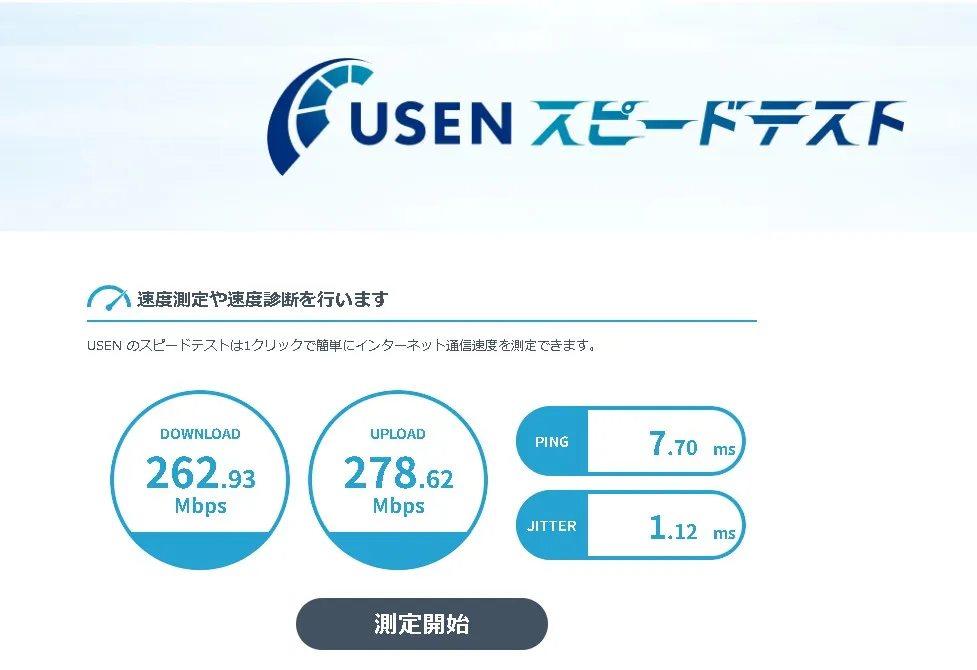
After: AsahiNet Hikari Cross 10Gb + 1Gbps NIC
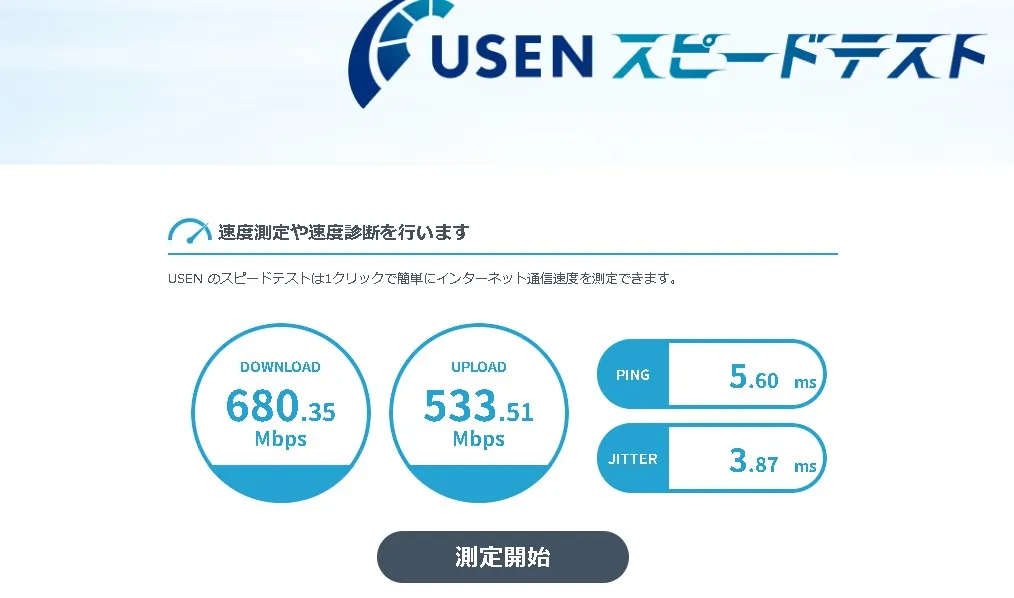
Update: After, AsahiNet Hikari Cross 10Gb + 5Gbps NIC
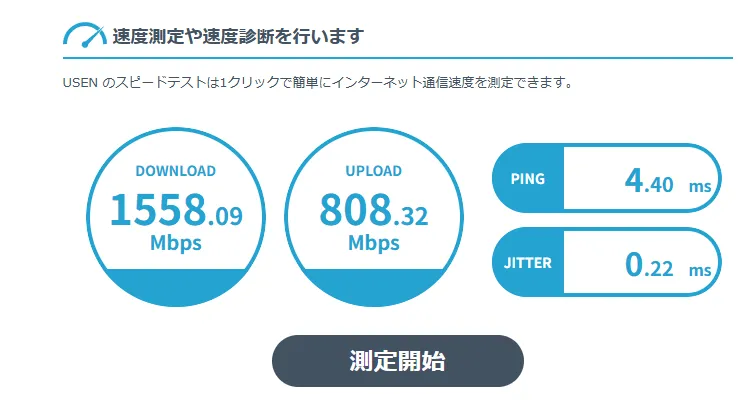
Measured with fast.com

Measurement with speed-cloudflare-cli

I measured the connection with speed-cloudflare-cli.
npx speed-cloudflare-cliNote: All numbers are the average of five runs. Note: The measurements were taken from the same location, my home LAN, using the same LAN cable. Note: I tried to keep the measurement time around 19:00 on Saturdays, although the month differs between runs.
Before: SoftBank Hikari 1Gb + 1Gbps NIC
Built-in NIC on a GIGABYTE Z370 AORUS Gaming 7 ATX motherboard (Realtek)
 Server location: Tokyo (NRT)
         Your IP: masked (JP)
         Latency: 8.76 ms
          Jitter: 5.72 ms
     100kB speed: 270.01 Mbps
       1MB speed: 233.06 Mbps
      10MB speed: 248.86 Mbps
      25MB speed: 245.26 Mbps
     100MB speed: 239.07 Mbps
  Download speed: 309.35 Mbps
    Upload speed: 186.17 Mbps
After: AsahiNet Hikari Cross 10Gb + 1Gbps NIC
Built-in NIC on a GIGABYTE Z370 AORUS Gaming 7 ATX motherboard (Realtek)
 Server location: Tokyo (NRT)
         Your IP: masked (JP)
         Latency: 6.46 ms
          Jitter: 4.15 ms
     100kB speed: 1029.35 Mbps
       1MB speed: 436.42 Mbps
      10MB speed: 728.12 Mbps
      25MB speed: 836.33 Mbps
     100MB speed: 664.05 Mbps
  Download speed: 1070.37 Mbps
    Upload speed: 232.96 Mbps
The built-in NIC on the GIGABYTE Z370 AORUS Gaming 7 ATX should have been capped at 1Gbps, but the measurement went a little over that. Maybe that is due to rounding or something in the measurement method? In any case, it feels like this PC is now reaching the maximum speed it can produce, so I am happy with that.
That said, even though I now have a 10Gbps connection, this PC is completely the bottleneck, which makes me want a new PC… If I ever buy one, I will measure it again.
Update: After, AsahiNet Hikari Cross 10Gb + 5Gbps NIC
I built a new PC, and the motherboard came with a 5Gbps NIC, so I measured it again. Built-in NIC on an ASRock X870E Nova WiFi motherboard (Realtek)
 Server Location: Tokyo (NRT)
         Your IP: masked (JP)
         Latency: 9.69 ms
          Jitter: 1.23 ms
     100kB speed: 266.09 Mbps
       1MB speed: 826.21 Mbps
      10MB speed: 2579.46 Mbps
      25MB speed: 3420.27 Mbps
     100MB speed: 3995.52 Mbps
  Download speed: 3412.77 Mbps
    Upload speed: 576.14 Mbps
The 10MB to 100MB results jumped all the way into the multi-Gbps range, which makes the 10Gb line feel satisfyingly powerful. For some reason, the lightweight 100kB download number went down?
Timing and other factors may be involved, but overall the numbers improved, so that is good enough. A speed test is, after all, only a speed test.
The small freezes disappeared
With the previous connection, in Marvel Rivals, VALORANT, Deadlock, and GUNDAM EVOLUTION, I often had freeze-like brief disconnects. During those freezes, other players would apparently see me as “the person walking slowly forward.” Since switching to the new connection, that has not happened so far.
Is it okay even though it is not a fixed IP?
AsahiNet uses a dynamic IP by default, so I was a bit worried, but so far it has not been a problem. At the moment, online games are comfortable to play, and VPN-like tools such as Hamachi also work fine. If any problems caused by this come up in the future, I will add an update.


![[PUBG] My Experience Working as an Analyst for a Top-Division Pro Team](https://blog.devkey.jp/en/posts/my-pro-league-analyst-experience/index.png)

![[PUBG] Lessons from Building and Operating Steins.GG, a Match Analysis Web App with 80,000 Cumulative Users](https://blog.devkey.jp/en/posts/steinsgg-lessons-learned/index.png)