After I enabled 3D V-Cache (X3D optimization) on my Ryzen 9 9950X3D, the onboard LAN (Realtek 5GbE) on my ASRock X870E Nova WiFi became unstable. In online games I started seeing more rubber-banding, Discord voice would cut out, and the network generally felt off.
I am sharing this because, while changing various settings, things improved after tweaking settings around EEE (Energy-Efficient Ethernet) and PCIE power saving.
Until I enabled 3D V-Cache, everything had been working without any problems, so my impression is that the 3D V-Cache-related change surfaced some compatibility issue around power saving or network link negotiation.
The First Thing That Worked (Temporary Workaround)
It took a lot of poking around to get here… It was rough…
Eventually, lowering EEE Max Support Speed to 2.5Gbps Full Duplex improved things.
In other words, I suspected that EEE (Energy-Efficient Ethernet) is ON by default, and that it seemed to have terrible compatibility with the power-related changes around 3D V-Cache.
Permanent Fix
NIC Power Management
Device Manager → Network adapters → target NIC → Properties → Power Management
Uncheck Allow the computer to turn off this device to save power.
NIC Advanced Settings
Device Manager → Network adapters → target NIC → Properties → Advanced
- Energy-Efficient Ethernet (EEE): Disabled
- Advanced EEE: Disabled
- Green Ethernet: Disabled
- Power Saving Mode: Disabled
Turn LSPM Off
Power Options -> PCI Express -> set Link State Power Management to Off
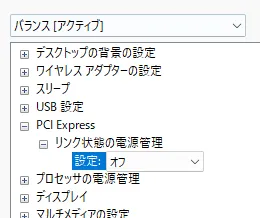
Note: If you use 3D V-Cache, it is better to leave the power plan itself on Balanced.
Summary
In my environment, applying these settings improved the issue.
Now it runs extremely stably even with EEE Max Support Speed set to 5Gbps Full Duplex.
I also have an article where I measured the speed of my 10Gbps internet connection, so check it out if you are interested!
PS. My PC looking happy after getting the ultimate internet connection