Create a Shadowverse WB deck from a QR image URL
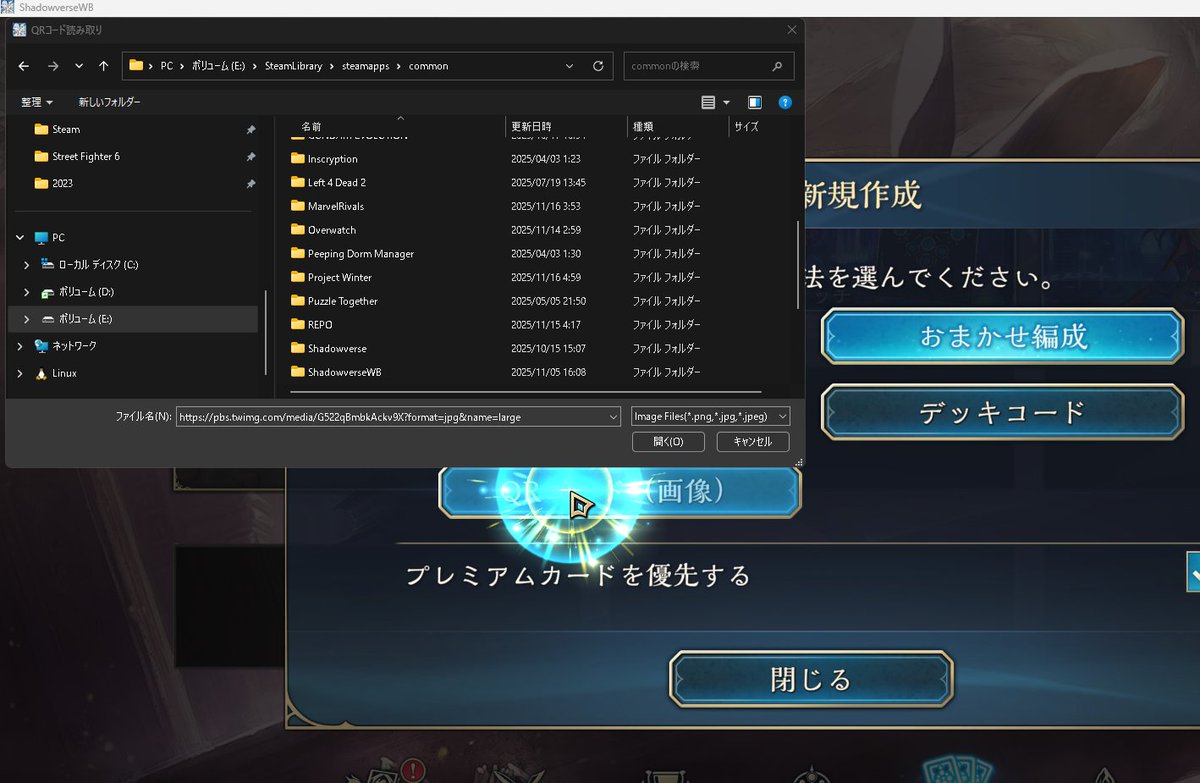
In the PC version of Shadowverse WB, the QR code reader can create a deck from an image URL pasted into the file picker’s “File name” field. You can try decks found on X without saving the QR image first.


In the PC version of Shadowverse WB, the QR code reader can create a deck from an image URL pasted into the file picker’s “File name” field. You can try decks found on X without saving the QR image first.
For an image on X, right-click the image, choose “Open image in new tab,” and copy an image URL like
https://pbs.twimg.com/media/xxxx?format=png.In the file picker, paste the URL into the “File name” field instead of choosing a saved image, then click “Open.” It is just a small shortcut that skips the local download step.
If the URL includes
&name=small, QR reading may fail. If it does not work, remove that part and try again.This is an example X image URL used as the QR image.
![I Want to Use Browser Twitter’s Video Clip Feature on X.com Too! [Easy Video Trimmer for X.com]](https://blog.devkey.jp/en/posts/easy-video-trimmer-for-x/index.png)
![[VALORANT] A Seriously Top-Tier Aim Training Method](https://blog.devkey.jp/en/posts/valorant-aim-training/index.png)
![[Twitch Follower Checker] How to Check New Followers and Unfollowers on a Twitch Channel](https://blog.devkey.jp/en/posts/twitch-follower-checker/index.png)